Free chat bot for Twitch and Kick
Layrstv is the free chat bot that comes with Layrs. Turn it on and it answers commands in your Twitch or Kick chat, posts timers, removes spam, runs points, giveaways and polls, and posts on Discord when you go live.
Updated
What it does
| Feature | What it does | On Twitch | On Kick |
|---|---|---|---|
| Commands | Your own commands, with variables, levels and cooldowns | Yes | Yes |
| Timers | Posts a message every few minutes while you’re live | Yes | Yes |
| Spam filters | Removes links, caps, symbols, emote spam, blocked words and long messages | Yes, as a mod | Yes, as a mod |
| Points & games | Viewers earn points and play !gamble, !give and !top | Yes | Yes, kept apart from Twitch viewers |
| Giveaways | A wheel, a duck race or a draw picks a winner | Yes | Yes, but not with a follow time |
| Polls | A mod starts one with !poll | A real Twitch poll, after you allow it | Viewers vote by typing 1, 2… |
| Shoutouts | A mod types !so @name | Twitch’s shoutout card and a line | A line with their Kick name and category |
| Title and category | A mod types !title or !game | After you allow it | After you allow it |
| Discord | One post when you go live | Yes | Yes |
| Ask AI | Mods on your team ask it to change the scene | Yes | Yes |
| Chat Bot badge | Twitch’s purple badge by its name | After you allow it | No |
Turn it on
Open Chat bot
Sign in to Layrs with Twitch or Kick and click Chat bot in the left rail. Its pages fold out under it.
Turn on the bot
Click Turn on the bot at the top. Layrstv joins your chat and answers commands right away, the Built in ones too.
Make it a mod
Next to Make it a mod, click Copy and send
/mod layrstvin your chat. On Twitch it answers without it, but needs it to answer in followers-only and slow mode and to remove spam. On Kick, mod it so it can answer and remove spam (on both, the rows read Mod it on Twitch and Mod it on Kick).Let it do more, if you like
Under Let it do more, click Allow on Twitch so mods can use
!title,!gameand!poll, and the bot gets Twitch’s Chat Bot badge. On Kick it lets mods change your title and category. Withdraw takes it back.
Commands
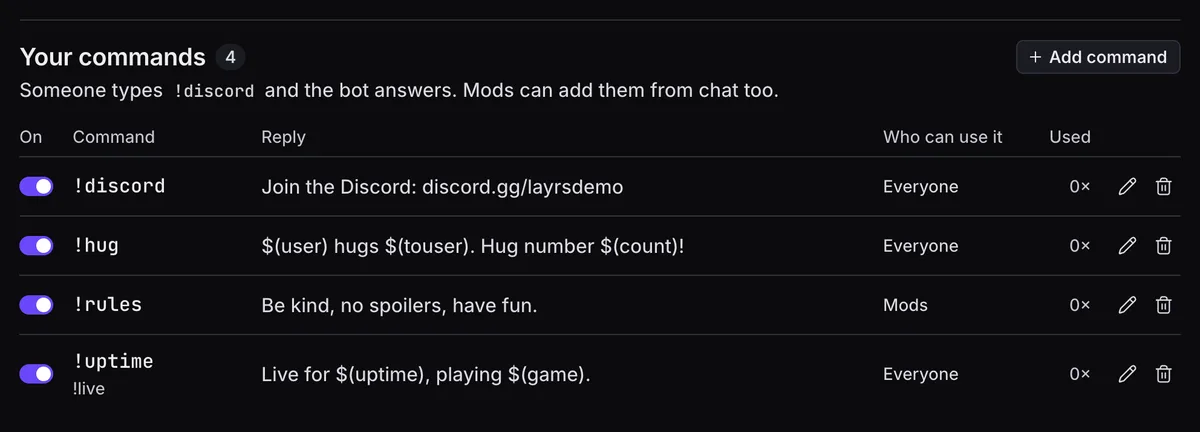
On Commands, click Add command, give it a name like !discord and write what the bot answers. The answer can fill in:
$(user): who typed it.$(touser): the name after the command, or who typed it.$(count): how often it was used.$(random 1-6): a number from 1 to 6.$(uptime),$(game),$(title)and$(viewers): your stream right now.$(followage)is Twitch only.
Under More options, pick Who can use it (Everyone, Subscribers, VIPs, Mods or Streamer), a Cooldown (5 seconds to start with) and one Per person. You can have up to 200 commands, each up to 500 characters.
Mods manage commands from chat: !addcom !hi Hello $(user), !editcom and !delcom !hi, with options like !addcom !rules -ul=mod -cd=30 Be kind. Coming from Nightbot? How the two compare.
Viewers type !commands for a link to your public commands page, /commands/yourname.
A command can also act on your overlay. Under On the overlay, click Add action: Play a clip of who it names (Twitch chat only), Play a video or clip, Play a sound or Change the overlay. Up to 4 per command. Clips and videos play on your Media share source; a viewer’s wait for a mod.
Timers and spam filters
On Timers, click Add timer, write the message and set Every (5 to 240 minutes) and After chat lines. It posts only while you’re live, once chat has said that many lines, so a quiet chat isn’t spammed. A new one starts at every 15 minutes after 5 lines. Up to 20 timers.
On Spam filters, switch them on and pick what to remove: Links, Caps, Symbols, Emote spam, Blocked words and Long messages. Then chooses Delete or Timeout. Mods, VIPs and you aren’t filtered to start. A mod’s !permit @name allows one link in the next 60 seconds. The bot has to be a mod for this.
Points, games and giveaways
On Points & games, switch on points and give them a Name in chat. Viewers earn them by chatting, following, subbing, cheering and raiding, and play with !points, !gamble 100, !give @friend 50 and !top. Just for fun: they can’t be bought or paid out.
On Giveaways, pick how the winner is chosen: Wheel, Elimination wheel, Duck race or Classic draw. Viewers type a word to enter (!join to start with). Give subscribers up to 10× the luck, make it Subscribers only, or Leave out mods or Leave out VIPs. Mods can run it from chat with !giveaway start, !giveaway roll and !giveaway end. The Giveaway source shows it on stream.
Every draw is provably fair. At the start, Layrs makes a secret seed and shows only its fingerprint (a SHA-256 hash, the seal) in small print on the overlay. Every spin, race and draw follows from the seed and the list of who entered. Once there’s a winner the seed shows too, so anyone can check it matches the seal. Check the draw replays it, and Copy the draw lets you share it.
A go-live post on Discord
On Discord, paste a Discord webhook URL (in Discord: channel settings → Integrations → Webhooks → New Webhook → Copy Webhook URL), pick No ping, @here or @everyone, and click Send test. Layrs posts once when you go live on Twitch or Kick, with your title, category and link; live on both, still one post. No Discord bot, and nothing is read from Discord.
Mods change the overlay from chat
Your mods need no Layrs account for this. In Twitch or Kick chat they type ;deaths 23, ;subathon +10m or ;show brb, and it changes on stream. It’s on to start; switch it off at Smart commands under Built in. See everything mods can type, the death counter and the subathon timer.
Once Ask AI is set up on its page under Chat bot, mods on your Layrs team can also ask in plain words: @layrstv put chat bottom left. It changes the scene on stream or makes a command, in the history with the mod’s name, and acts at most as an Editor; other mods get a short no. Ask AI never sees chat, only what a mod asks it. Building for a streamer.
What it doesn’t do
- No song requests. Viewers can send YouTube videos and Twitch clips with
!media <link>to Media share, and a mod approves each one. - No
$(urlfetch)or$(customapi): commands can’t fetch from other websites. - No chat logs: chat isn’t stored, and spam filters forget each message.
- Twitch and Kick only.
- On Kick: no
$(followage), clips, Chat Bot badge or giveaway follow time. Kick’s API can’t give them.
FAQ
Is the chat bot free?
Yes. Commands, timers, spam filters, points, giveaways and the Discord post are free, like every Layrs overlay.
Does the bot need to be a mod?
On Twitch it answers without it, but needs it to answer in followers-only and slow mode and to remove spam. On Kick, mod it so it can answer and remove spam. Type /mod layrstv in your chat.
Does it work on Kick?
Yes, nearly all of it. Follow time, clips and the Chat Bot badge stay Twitch only.
Can I keep my Nightbot or StreamElements commands?
From StreamElements, yes: Import from StreamElements brings your commands and timers over, and your spam filters and loyalty points come in switched off. There’s no Nightbot import, but the bot reads the same $(user), $(touser), $(count) and $(random) tags and Nightbot’s -ul= and -cd= options, so a mod can paste each one with !addcom.
What name does the bot use?
Layrstv, from its own account on Twitch and on Kick. It’s one bot for every channel, so it can’t post under your name.
Can viewers see the commands?
Yes. !commands links to your public commands page, with every command that’s on except the ones only you can use. It’s up while the bot is on.